Why I Include Four Processing Strength Levels in Every Custom Processing Preset Package
Aug 12, 2026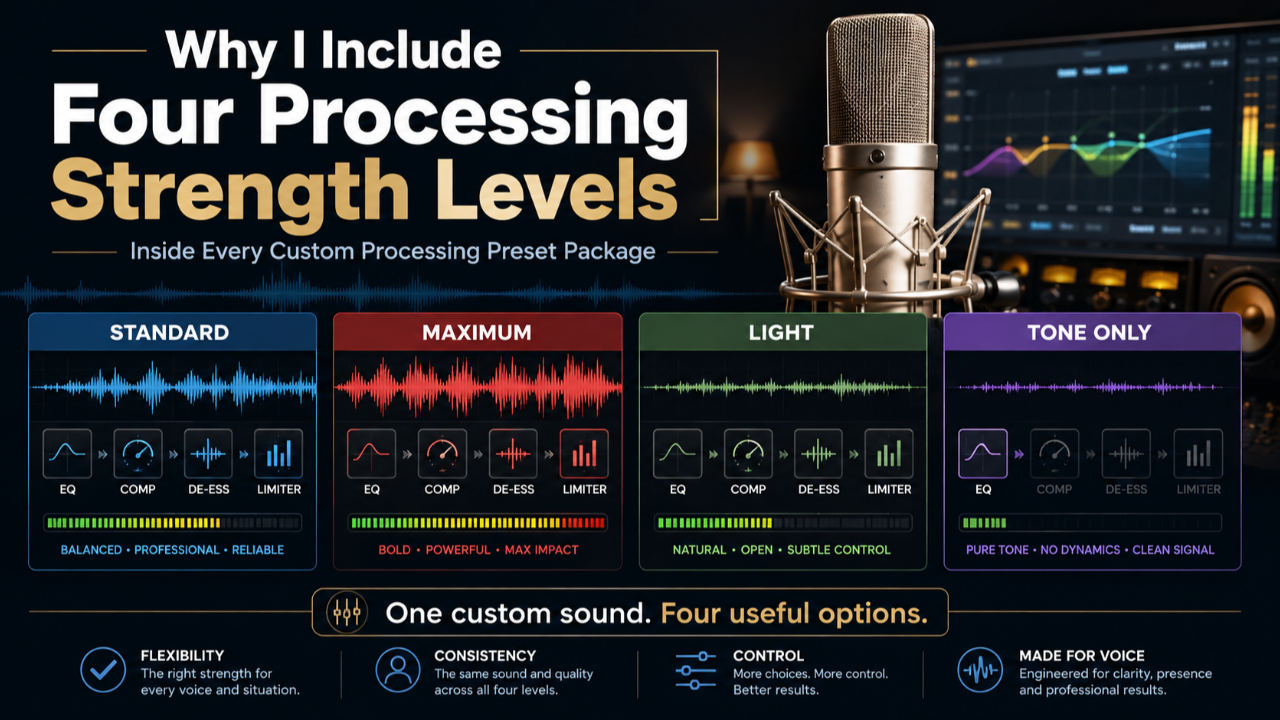
One of the most important parts of my Custom Processing Preset package is something I call the Strength Level Package.
Instead of giving you one processing chain and expecting it to work equally well for every type of recording, I create four related versions of your custom setting:
- Standard
- Maximum
- Light
- Tone Only
They are not four completely different presets.
Think of them as four different intensities of the same custom sound.
The tonal balance, compression behavior, dynamics, and overall sound are built specifically around your voice, microphone, recording environment, and workflow. The different strength levels then give you flexibility to choose how much processing makes sense for the performance you are creating.
That flexibility is one of the reasons I include all four versions in the package.
First: What Is a Custom Processing Preset?
My Custom Processing Preset is a processing chain I build specifically for an individual voice and recording setup.
I begin by reviewing your raw, unprocessed recording and determining whether the recording foundation is stable enough for a custom preset to be useful.
If it is, I build a processing chain around that specific combination of:
- your voice
- your microphone
- your recording environment
- your recording level
- your software and workflow
The objective is not to make you sound heavily processed.
The objective is to make your voice sound like you—only more balanced, controlled, polished, and consistent.
During a recent discovery call, I was working with a voice actor whose raw recording was already extremely stable. Because I did not have to spend the processing trying to repair major problems, I could focus much more on subtle balancing, compression, and sweetening.
That is exactly the kind of situation where the different strength levels become useful.
Once the core sound is established, the question becomes:
How much of that processing best supports this particular performance?
Standard: The Reference Sound
The Standard setting is the primary version of the preset.
This is usually the sound I demonstrate when I create your processed example.
It represents what I consider the best overall balance between:
- tonal balance
- compression
- consistency
- presence
- polish
- natural dynamics
For many recordings, Standard may be the version you use most often.
It should sound finished without sounding artificially processed.
In the discovery call referenced above, I described Standard as the version the client had already heard. The other strength levels were simply alternate “flavors” of that same custom setting.
Maximum: More Density, Control, and Impact
The Maximum setting increases the processing intensity—particularly the compression.
That can make the voice feel:
- more controlled
- more forward
- more aggressive
- more consistent
- more “broadcast”
- more impactful
This can work extremely well when the performance itself is energetic.
For example, imagine a high-energy retail commercial:
“Twenty percent off all lawn mowers and chainsaws this weekend only.”
That type of performance may benefit from additional density and compression because the processing reinforces the emotional intention of the read.
That is how I explained Maximum during the discovery call: stronger compression can create a more aggressive, punchy presentation when the material calls for it.
The important idea is this:
Processing should support the performance—not fight it.
Light: When Natural Dynamics Matter More
The Light version moves in the opposite direction.
It uses less compression than Standard and allows more of the natural movement of the voice to remain intact.
This can be useful for:
- intimate narration
- emotional commercials
- softer reads
- reflective storytelling
- delicate character moments
- conversational material
If the performance is intentionally vulnerable or understated, heavier compression can sometimes work against the emotion.
Light gives you a version that retains more of the natural dynamics while still preserving the tonal identity of your custom setting.
During the call, I used the example of a delicate Mother's Day commercial or a softer narration passage. In those situations, Light can preserve more natural movement while still giving you the tonal foundation of the preset.
Tone Only: A Useful Option When a Client Asks for Raw Audio
Tone Only may be the most misunderstood version of the package.
It exists partly because of something that happens frequently in professional voiceover.
Imagine this:
You audition using your processed sound.
The client likes it.
You win the job.
Then they say:
“Great. Send us the final script—and please send the audio raw.”
Now you have a practical problem.
The sound that helped you win the audition included your processing.
Your completely untreated raw file may sound noticeably different.
Tone Only gives you another option.
Instead of applying the full compression and polish of the Standard preset, Tone Only retains primarily the tonal balancing and lighter corrective processing.
Depending on the voice and recording, I may also retain things such as subtle gating or click cleanup.
The result is much closer to a raw recording, while still maintaining the tonal balance that helped define your processed sound.
During the discovery call, I described exactly this situation. Tone Only gives a voice actor a way to stay closer to the tonal character of the audition sound while still providing something much closer to raw audio when requested.
In that situation, I often recommend over-communicating with the client:
Send the raw file they requested.
Then, when appropriate, also provide the processed or Tone Only version and let them choose what best fits their production workflow.
Why I Don't Believe in One Processing Chain for Everything
A processing preset is not just a technical utility.
It affects the emotional presentation of the performance.
Compression can make a voice feel:
- more intimate
- more commanding
- more urgent
- more controlled
- more conversational
- more produced
EQ and tonal shaping can make a voice feel:
- warmer
- brighter
- more forward
- more open
- more authoritative
Those qualities should support what you are trying to communicate.
That is why I do not like the idea of building one processing chain and telling someone:
“Use this on everything.”
Your processing should adapt to the performance.
You should not have to rebuild your entire signal chain every time.
That is the purpose of the four strength levels.
You get a consistent sonic identity, but enough flexibility to choose how strongly that identity is applied.
The Real Goal: Stop Thinking About Your Processing
There is another reason I include the different strengths.
Once your system is configured correctly, I want the technical side to become simple.
You record.
You edit.
Then you can quickly listen through:
Standard.
Maximum.
Light.
Tone Only.
And choose the version that best supports the performance.
During the call, I described exactly that Adobe Audition workflow: finish the recording and edits, then audition the different preset versions and choose the one that feels right for that particular read.
You should not have to rebuild compressors, adjust EQ bands, research another plugin, or wonder whether your processing is helping or hurting the audition.
The technical decisions have already been built into the system.
Your job becomes:
Perform. Listen. Choose. Deliver.
That is the point.
Why the Strength Level Package Is Included
The four strength levels are not an add-on.
They are an important part of how I think about the Custom Processing Preset itself.
A single fixed chain may work well for one kind of read and be less appropriate for another.
The Strength Level Package gives you a practical way to adapt the same custom sound across different performances without changing the core processing philosophy behind it.
You are not choosing between four unrelated sounds.
You are choosing between four versions of your sound.
That is why I include all four.
Want to Hear What Your Own Custom Processing Could Sound Like?
The easiest way to understand custom processing is not to read about it.
It is to hear it on your own voice.
You can send me a short raw voice recording and I will personally review it.
If your recording is ready for custom processing, I can create a free custom-processed example so you can compare your raw recording with what I would do to it.
There is no cost and no obligation.
Submit your raw audio here:
Send me your recording and hear what your voice could sound like with processing built specifically for you, your microphone, and your recording environment.